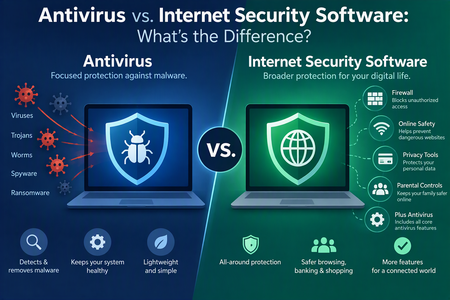
In today’s digital world, protecting your computer and personal information from cyber threats is more important than ever. Whether you use your device for work, online shopping, banking, entertainment, or everyday browsing, security risks are always present. Viruses, malware, phishing attacks, ransomware, and malicious websites can put your data and privacy at risk.
To protect against these threats, many users turn to antivirus or internet security software. Although these two terms are often used interchangeably, they do not mean exactly the same thing. Both are designed to protect your devices, but they differ in their features, level of protection, and overall capabilities.
So, what is the difference between antivirus and internet security software, and which one should you choose? Let’s take a closer look.
What Is Antivirus Software?
Antivirus software is a security program designed primarily to detect, prevent, block, and remove malicious software from computers and other devices.
Traditionally, antivirus programs focused on identifying computer viruses. However, modern cyber threats have become more sophisticated, so today’s antivirus solutions protect against a much wider range of malicious programs.
Most antivirus software can detect and remove threats such as:
- Computer viruses: Malicious programs that infect files and spread between devices.
- Trojans: Programs that disguise themselves as legitimate software to gain unauthorized access.
- Worms: Malware that can spread across networks without requiring user interaction.
- Spyware: Software that secretly monitors user activity and collects personal information.
- Ransomware: Malware that locks or encrypts files and demands payment to restore access.
- Rootkits: Malicious tools designed to hide unauthorized activity on a device.
Modern antivirus software typically offers real-time protection, scheduled scans, automatic updates, and quarantine features. These functions help identify suspicious activity and prevent malware from damaging your system.
For users who mainly need basic protection against malware and viruses, a reliable antivirus program can be an effective solution.
What Is Internet Security Software?
Internet security software is a more comprehensive security solution that combines antivirus protection with additional features designed to protect users while they are online.
While traditional antivirus software concentrates mainly on detecting and removing malware, internet security suites aim to provide broader protection against online threats, identity theft, privacy risks, and unauthorized access.
Depending on the provider and subscription package, internet security software may include:
- Firewall protection: Monitors incoming and outgoing network traffic to help block unauthorized connections.
- Anti-phishing protection: Identifies fraudulent websites and attempts to steal sensitive information.
- Web protection: Blocks access to malicious or suspicious websites.
- Email protection: Scans email attachments and links for potential threats.
- Spam filtering: Helps reduce unwanted and potentially dangerous emails.
- Parental controls: Allows parents to manage children’s internet access and online activities.
- Privacy protection: Helps prevent unauthorized access to sensitive information.
- Password management: Securely stores and manages login credentials in supported packages.
Some internet security suites also offer VPN services, identity monitoring, webcam protection, and tools for securing online transactions.
The exact features vary depending on the software provider and subscription plan. Therefore, it is always worth checking what is included before purchasing a security package.
Antivirus vs. Internet Security Software: Key Differences
The biggest difference between antivirus and internet security software is the range of protection they provide.
Antivirus software primarily focuses on malware detection and removal, whereas internet security software generally combines antivirus protection with additional tools for safer internet use.
Here is a comparison of their main characteristics:
| Feature | Antivirus Software | Internet Security Software |
|---|---|---|
| Virus detection and removal | Yes | Yes |
| Malware protection | Yes | Yes |
| Real-time scanning | Usually | Usually |
| Firewall | Not always | Often |
| Anti-phishing protection | Varies | Often |
| Email protection | Varies | Often |
| Spam filtering | Rarely | Sometimes |
| Parental controls | Rarely | Sometimes |
| Privacy protection | Basic or limited | Often more comprehensive |
| VPN | Rarely | Sometimes |
| Price | Usually lower | Usually higher |
It is important to remember that these categories are not always clearly separated. Many modern antivirus products already include features traditionally associated with internet security suites.
For this reason, comparing the actual features of individual products is more useful than relying solely on their names.
Which One Offers Better Protection?
There is no universal answer because the best option depends on your online habits, security requirements, and the types of threats you want to protect against.
Antivirus software may be sufficient if:
- You mainly use your computer for basic activities.
- You rarely visit unfamiliar websites.
- You do not frequently download files from unknown sources.
- You already use other security tools, such as a separate firewall.
- You want affordable protection against common malware threats.
Internet security software may be a better choice if:
- You frequently shop or bank online.
- You regularly download files and applications.
- You receive many emails and attachments.
- Multiple family members use your devices.
- You want additional protection against phishing and malicious websites.
- You prefer having several security features managed through one application.
For people who spend considerable time online, an internet security suite can provide an additional layer of protection and convenience.
However, buying a more expensive package does not automatically guarantee better security. The quality of malware detection, frequency of updates, system performance, and reliability of individual features are equally important.
Advantages and Disadvantages of Antivirus Software
Before choosing a security solution, it is worth understanding the advantages and limitations of traditional antivirus programs.
Advantages:
- Affordable protection: Antivirus programs are generally less expensive than comprehensive internet security suites.
- Easy to use: Most antivirus applications have simple interfaces and require minimal technical knowledge.
- Malware detection: They help identify, block, and remove various types of malicious software.
- Low resource usage: Many antivirus programs are designed to run efficiently without significantly affecting system performance.
- Essential security: They provide an important layer of protection against common cyber threats.
Disadvantages:
- Limited features: Basic antivirus packages may not include advanced privacy, firewall, or parental control tools.
- Less online protection: Some products offer limited protection against phishing websites and fraudulent links.
- Additional software may be needed: Users may need separate applications for password management, VPN services, or other security functions.
Advantages and Disadvantages of Internet Security Software
Internet security suites offer more features, but they also have some potential drawbacks.
Advantages:
- Comprehensive protection: They combine antivirus technology with additional security tools.
- Safer browsing: Web protection and anti-phishing features can help prevent users from accessing dangerous websites.
- Network security: Firewall protection can help monitor suspicious network activity.
- Family protection: Certain packages include parental controls and tools for managing multiple devices.
- Convenience: Several security features are available through a single application and subscription.
Disadvantages:
- Higher cost: Internet security suites usually cost more than basic antivirus programs.
- Greater resource usage: Additional background features may consume more memory and processing power.
- Unnecessary features: Some users may pay for tools they rarely or never use.
- Subscription limitations: Certain advanced features may require separate subscriptions or premium plans.
How to Choose the Right Security Software
Choosing between antivirus and internet security software does not have to be complicated. Start by considering how you use your devices and what you want to protect.
Here are a few important factors to consider:
1. Identify Your Security Needs
Think about your everyday online activities. If you mainly browse trusted websites and use your computer for simple tasks, basic antivirus protection may be enough. However, if you frequently shop online, access financial accounts, or download files, additional security features can be beneficial.
2. Check the Available Features
Do not choose a security product based only on its name or marketing claims. Compare its malware protection, firewall, phishing detection, privacy tools, and other features.
3. Consider System Performance
Security software should protect your device without making it unnecessarily slow. Look for products that offer efficient scanning and have a minimal impact on system performance.
4. Review Independent Security Tests
Check independent testing organizations such as AV-TEST and AV-Comparatives. Their evaluations can help you understand how well different security products detect malware, block online threats, and affect computer performance.
5. Compare Pricing and Subscription Plans
Some providers offer basic, standard, and premium packages. Compare the number of supported devices, included features, renewal costs, and subscription terms before making a decision.
6. Look for Regular Updates
Cybercriminals constantly develop new attack methods. Choose software that receives frequent security updates and provides reliable real-time protection.
Is Free Antivirus Software Good Enough?
Many users wonder whether free antivirus software provides sufficient protection or whether paying for a premium security package is necessary.
The answer depends on your needs.
Reputable free antivirus products can offer effective protection against common malware threats. They are often a good starting point for users who want essential security without paying for a subscription.
However, free versions may lack advanced features such as comprehensive firewall tools, dedicated phishing protection, parental controls, VPN services, and identity monitoring.
Paid internet security suites generally offer a broader range of features, making them attractive to users who want additional protection and convenience.
Regardless of which option you choose, make sure your security software is genuine, regularly updated, and obtained from a trusted provider.
Final Thoughts: Antivirus or Internet Security Software?
Both antivirus and internet security software play an important role in protecting computers and personal information from cyber threats.
Antivirus software is primarily designed to detect and remove malware, making it a suitable option for users who need essential device protection. Internet security software builds on these capabilities by adding features such as firewall protection, anti-phishing tools, email security, and parental controls.
If you want straightforward malware protection at a lower cost, a good antivirus program may be all you need. If you frequently use the internet for shopping, banking, communication, and other sensitive activities, an internet security suite may offer greater convenience and broader protection.
Ultimately, the right choice depends on your budget, online behavior, and security requirements. Whichever solution you select, remember that security software is only one part of staying safe online. Keep your operating system and applications updated, use strong and unique passwords, enable multifactor authentication, and avoid clicking suspicious links or downloading files from untrusted sources.
A combination of reliable security software and sensible online habits is one of the best ways to protect yourself in today’s increasingly connected world.