No-Code vs. Low-Code Platforms: Which Should You Choose?
In today’s fast-paced digital world, businesses are constantly looking for ways to build applications, automate workflows, and improve efficiency without spending months on traditional software development. This growing demand has led to the popularity of two powerful development approaches: no-code and low-code platforms.
Both options promise faster development, reduced costs, and greater flexibility. However, they serve different purposes and audiences. Choosing the right one can make a significant difference in how efficiently your business develops and manages its digital solutions.
So, should you choose a no-code platform or a low-code platform? Let’s explore their differences, advantages, limitations, and ideal use cases to help you make an informed decision.
What Are No-Code Platforms?
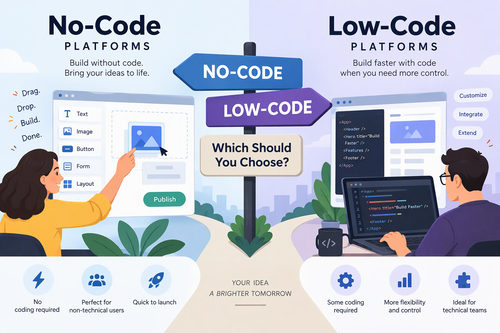
No-code platforms allow users to create applications, websites, and automated workflows without writing programming code. Instead of traditional coding, they use visual development tools such as drag-and-drop editors, prebuilt templates, and ready-made components.
These platforms are designed primarily for non-technical users, including entrepreneurs, marketers, business owners, and operations teams.
With no-code development, users can build functional digital products by arranging visual elements and configuring settings rather than writing complex code.
Popular no-code platforms include:
- Bubble: Build interactive web applications using visual development tools.
- Webflow: Design and publish professional websites without traditional coding.
- Glide: Create applications using data from spreadsheets and other sources.
- Airtable: Build database-driven workflows and business applications.
- Zapier: Automate tasks and connect different applications.
Benefits of No-Code Platforms
1. No Programming Skills Required
One of the biggest advantages of no-code development is accessibility. Almost anyone can create an application without having a background in software engineering.
2. Faster Development
Prebuilt templates and visual components make it possible to develop applications much faster than traditional programming methods.
3. Lower Initial Costs
Businesses can reduce their dependence on specialized developers, potentially saving money on development and maintenance.
4. Easy to Use
Most no-code platforms feature intuitive interfaces that make building and modifying applications relatively straightforward.
5. Greater Business Independence
Non-technical teams can create solutions for their own needs without waiting for development teams to handle every small request.
Limitations of No-Code Platforms
Despite their advantages, no-code platforms have some limitations:
- Limited customization compared with traditional software development.
- Dependence on the platform’s available features and integrations.
- Potential difficulty handling highly complex applications.
- Vendor lock-in and migration challenges.
- Less control over underlying architecture and infrastructure.
No-code is an excellent choice for straightforward applications, but it may not be suitable for every business requirement.
What Are Low-Code Platforms?
Low-code platforms also use visual development tools to simplify application creation. However, unlike no-code platforms, they allow developers to add custom code whenever necessary.
This combination of visual development and traditional programming provides greater flexibility and control.
Low-code platforms are particularly useful for professional developers and organizations that need to build complex applications while reducing development time.
They allow teams to use prebuilt components for common functionality and write custom code for specialized requirements.
Popular low-code platforms include:
- Microsoft Power Apps: Develop business applications and connect them with Microsoft services.
- OutSystems: Build enterprise-grade applications using visual development tools.
- Mendix: Develop and manage complex business applications.
- Appian: Create enterprise applications and automate business processes.
- Salesforce Platform: Build customized business applications within the Salesforce ecosystem.
Benefits of Low-Code Platforms
1. Greater Customization
Developers can write custom code to implement features that are not available through standard visual components.
2. Faster Application Development
Reusable components, automated workflows, and visual tools help development teams build applications more efficiently.
3. Integration Capabilities
Many low-code platforms support APIs, databases, and third-party services, making it easier to connect different business systems.
4. Better Support for Complex Applications
Low-code platforms are generally better suited to applications that require advanced business logic, custom functionality, or sophisticated integrations.
5. Collaboration Between Developers and Business Teams
Business users can contribute to application design while developers handle complex technical requirements.
Limitations of Low-Code Platforms
Low-code development also comes with certain challenges:
- Some programming knowledge is usually necessary.
- Advanced customization may require experienced developers.
- Licensing and subscription costs can increase as usage grows.
- Platform-specific knowledge may create vendor dependency.
- Complex projects can still require significant testing and maintenance.
Low-code reduces the amount of programming required, but it does not eliminate the need for technical expertise.
No-Code vs. Low-Code: Key Differences
Although both approaches simplify software development, there are several important differences.
| Feature | No-Code | Low-Code |
|---|---|---|
| Coding requirements | No coding required | Minimal coding, with custom code available |
| Target audience | Non-technical users | Developers and technical teams |
| Development speed | Generally very fast | Fast, depending on complexity |
| Customization | Limited to platform features | Greater customization |
| Flexibility | More restricted | More flexible |
| Complexity | Simple to moderately complex projects | Moderately to highly complex projects |
| Technical knowledge | Usually minimal | Basic to advanced, depending on the project |
| Best for | Simple apps and workflows | Complex business applications |
The main distinction is flexibility. No-code platforms prioritize simplicity and accessibility, while low-code platforms balance ease of development with technical control.
When Should You Choose a No-Code Platform?
A no-code platform is usually the better option when you want to create a solution quickly without relying on developers.
Consider choosing no-code if:
1. You Are a Startup or Small Business
Startups often operate with limited budgets and small teams. No-code tools can help them develop websites, customer portals, internal applications, and business workflows without hiring a full development team.
2. You Need a Simple Application
If your application has relatively straightforward functionality, a no-code platform may provide everything you need.
3. You Want to Build an MVP
A minimum viable product (MVP) allows businesses to test an idea before investing heavily in development. No-code platforms make it easier to launch prototypes and collect user feedback quickly.
4. Your Team Has Limited Technical Experience
Marketing, sales, HR, and operations teams can use no-code tools to automate repetitive processes and develop internal solutions independently.
5. Speed Is Your Top Priority
When you need to launch a solution quickly, no-code development can help reduce the time between an idea and a working product.
When Should You Choose a Low-Code Platform?
Low-code is often the better choice when your project requires advanced functionality, integrations, or customization.
Consider choosing low-code if:
1. You Need Complex Business Applications
Organizations developing enterprise applications may require sophisticated workflows, custom business logic, and multiple user roles. Low-code platforms offer greater flexibility for these requirements.
2. You Have an In-House Development Team
If your organization already employs developers, low-code tools can help them work more efficiently without sacrificing control over important technical decisions.
3. You Need Advanced Integrations
Applications that communicate with multiple databases, APIs, and enterprise systems often benefit from the integration and customization capabilities of low-code platforms.
4. Security and Governance Are Important
Businesses operating in regulated industries may need detailed control over authentication, permissions, data handling, and deployment.
Low-code platforms can offer enterprise governance features, although their actual security capabilities depend on the provider, configuration, and implementation.
5. You Expect Your Application to Grow
If you anticipate increasing complexity, expanding functionality, or integrating additional systems, low-code may provide more room for customization.
No-Code vs. Low-Code: Real-World Examples
Understanding practical applications can make the decision easier.
Here are a few examples of how businesses can use each approach.
No-Code Examples
- Online Store: Build an online storefront using Shopify without developing an e-commerce application from scratch.
- Appointment Booking: Create a booking system using a visual application builder.
- Marketing Automation: Connect email marketing tools, customer databases, and lead-generation forms using Zapier.
- Internal Dashboard: Create a simple employee dashboard using Airtable or Glide.
- Website Development: Design and publish a professional business website using Webflow.
Low-Code Examples
- Enterprise Resource Planning (ERP): Develop customized business applications that connect finance, inventory, and operations.
- Customer Relationship Management (CRM): Create advanced customer management solutions with custom workflows.
- Employee Management Systems: Build applications that integrate employee records, approval processes, and reporting.
- Financial Applications: Develop business applications that require specialized calculations, integrations, and access controls.
- Enterprise Workflow Automation: Automate complex approval processes across multiple departments and business systems.
These examples demonstrate that no-code is particularly effective for accessible, focused solutions, while low-code is better suited to applications requiring deeper customization.
Factors to Consider Before Choosing a Platform
Selecting between no-code and low-code requires more than comparing features. You should also evaluate your organization’s long-term needs.
Here are five important factors to consider.
1. Project Complexity
Start by identifying what you want to build.
If you need a basic website, form, dashboard, or workflow, no-code may be sufficient.
However, if your application requires complex business logic, custom integrations, or specialized functionality, low-code may be more appropriate.
2. Budget
Both approaches can reduce development expenses, but their pricing structures vary.
No-code platforms often have affordable entry-level plans, making them attractive to startups and small businesses.
Low-code platforms may involve higher licensing fees, developer costs, and enterprise subscription expenses.
Always consider the total cost of ownership, including maintenance, integrations, hosting, and future upgrades.
3. Available Technical Skills
Evaluate your team’s existing capabilities.
If your team has little or no programming experience, no-code platforms offer an easier starting point.
If you have developers who understand programming, databases, and APIs, low-code platforms may provide greater long-term value.
4. Scalability
Think about how your application might evolve.
Will it support more users? Will you need additional integrations? Could the business logic become more complicated?
Choose a platform that can accommodate your expected growth without creating unnecessary migration or redevelopment costs.
5. Security and Compliance
Security should never be an afterthought.
Before selecting a platform, examine its authentication options, access controls, encryption, data storage policies, backup capabilities, and compliance certifications.
For applications handling sensitive information, involve your IT and security teams before making a final decision.
Can You Combine No-Code and Low-Code?
Yes. In fact, combining both approaches can be an effective strategy.
Businesses do not necessarily need to choose one development approach for every project.
For example, a company might use no-code tools to build internal forms, automate notifications, and create simple dashboards. At the same time, its development team could use low-code tools to develop a more sophisticated customer-facing application.
This hybrid approach offers several advantages:
- Non-technical employees can manage simple business processes.
- Developers can focus on complex technical challenges.
- Teams can reduce development bottlenecks.
- Businesses can choose tools based on individual project requirements.
- Organizations can improve productivity across departments.
The key is to establish clear governance so that applications, integrations, and data remain secure and manageable.
The Future of No-Code and Low-Code Development
No-code and low-code development are becoming increasingly important as businesses look for faster and more accessible ways to build digital solutions.
Artificial intelligence is also changing how these platforms work.
Many modern development tools are introducing AI-powered features that can generate application components, suggest workflows, create code, and help users troubleshoot problems.
These capabilities may make application development even more accessible to people without extensive programming experience.
However, AI-generated applications still require proper testing, security reviews, and human oversight.
Rather than completely replacing professional developers, no-code, low-code, and AI-assisted development are likely to change how development teams work.
The ability to combine technical expertise with visual development tools will remain valuable for businesses of all sizes.
Final Verdict: No-Code or Low-Code?
So, which should you choose?
The answer depends on your project requirements, available resources, technical expertise, and long-term business goals.
Choose no-code if you want simplicity, affordability, and speed. It is ideal for startups, entrepreneurs, small businesses, and non-technical teams that need to build applications or automate everyday processes.
Choose low-code if you need greater flexibility, advanced integrations, and customized functionality. It is particularly suitable for businesses with development teams and organizations building complex applications.
Ultimately, neither approach is universally better. The right choice is the one that solves your business problem effectively without introducing unnecessary complexity or costs.
Before committing to a platform, identify your requirements, test a few solutions, and consider how your application might grow over time.
By making an informed decision, you can take advantage of modern development tools, accelerate digital transformation, and build solutions that support your business goals.
The bottom line: No-code makes software development accessible to more people, while low-code gives developers more freedom to build sophisticated solutions. Both approaches have an important place in the future of application development.